Reseller panel
The reseller panel
What this does: a reseller is someone who sells hosting to customers of their own, on a server run by someone else (their host). These pages are for resellers: how to sign in, what you can do, and how to put your own name on what your customers see.
When you need it: when your host has made you a reseller login, and you want to set up your first customers.
What you get
Your host gives you:
- A reseller login. You sign in with it to the admin panel, the same panel your host uses. You see a smaller menu: only the tools for your own customers.
- Your own hosting account. It has the same username, password and two-factor sign-in as your reseller login. You sign in to it in the customer panel (
https://server.example.com:7444/), like any customer, for your own website and email. - Limits. How many accounts you may make, and how much disk space and monthly traffic you may give out in total. Your host sets them.
- Rights. Extra things your host may let you do, such as using your own logo. See Your limits and rights.
To sign in as a reseller
- Open the address your host gave you for the admin panel in your browser. It usually ends in
:7443, for examplehttps://server.example.com:7443/. (A port, the number after the colon, is a numbered door on the server.) - Type your reseller username and password, then click the sign-in button.
- If you turned on two-factor sign-in, type the code from your phone app.
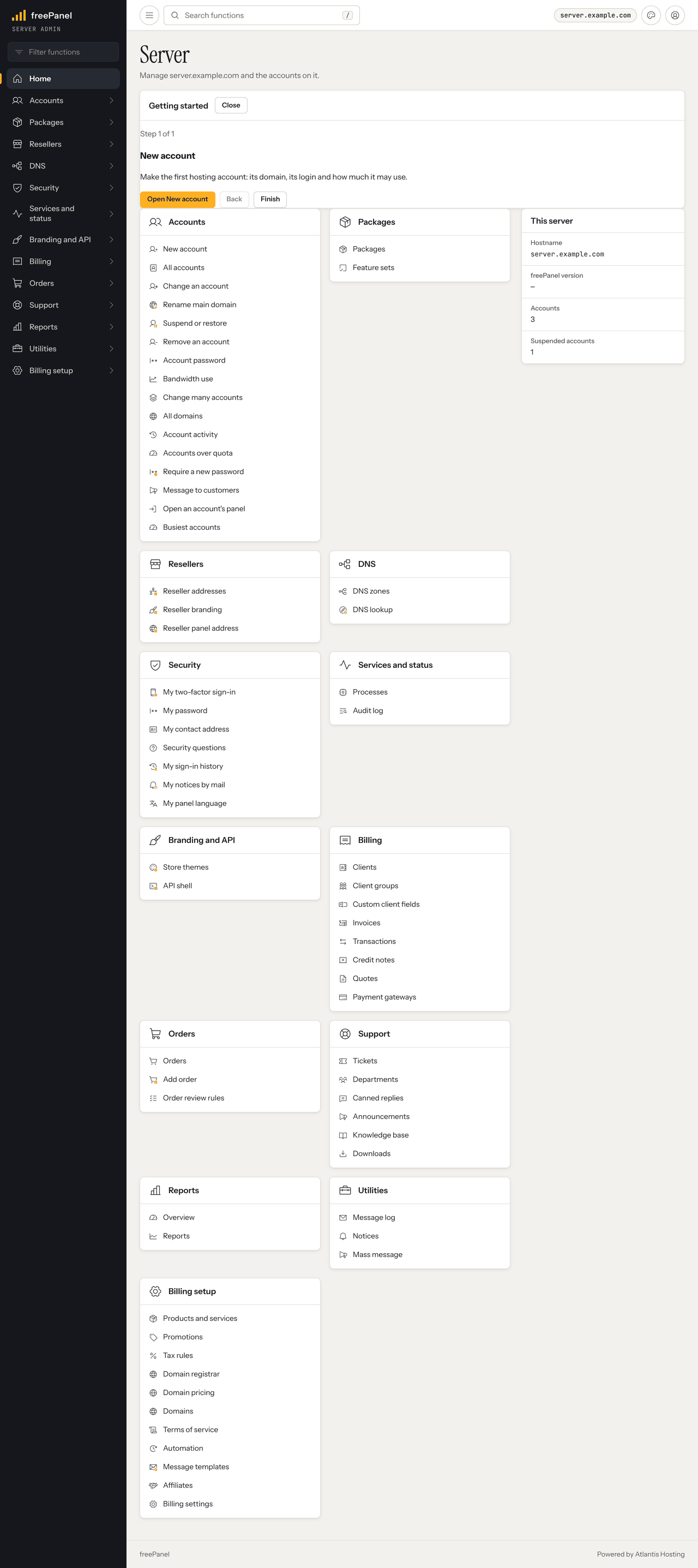
- You see the home page and, on the left, the menu of tool groups.
If you can't sign in, ask your host. They may have turned your login off, or your own hosting account may be suspended: that stops your sign-in in both panels.
What you can do
Each group in your menu works as in the admin panel pages, but only for your own customers:
| Group | What you can do there |
|---|---|
| Accounts | Make, find, change, suspend and remove your customers' accounts; see their bandwidth and disk use; write to them; open their panel to help them. See Accounts. |
| Packages | Make the plans you sell, and choose which tools each plan includes. See Packages. |
| Resellers | Your own branding, your addresses and your own panel address. See the pages below. |
| DNS | See your customers' DNS zones and look up a domain. See DNS zones and DNS lookup. |
| Security | Your own two-factor sign-in, security questions, sign-in history, notices by mail and panel language. |
| Services and status | The programs running on your accounts (Processes), and the log of what was changed (Audit log). |
| Branding and API | The look of your store (Store themes), and API shell, a page for trying the panel's API (the way programs talk to the panel). |
| Billing, Orders, Support, Reports, Utilities and Billing setup | Your own billing: your clients, their invoices and orders, support tickets, reports, your store's products and prices. They are there when your host has billing turned on; see the Billing pages. |
Some things only your host can do: give shell (SSH) access, set processor and memory limits, suspend or remove your own hosting account, and work with backups of the whole server. You can still make and download a copy of one of your accounts with the Download button in All accounts.
Things that work differently for a reseller
- Package names. The server puts your username and
_in front of your package names. If your username isresland you makeSmall, it is calledresl_Small. - Your limits. If your host gave you a disk or bandwidth limit, every package you make must set one too. An account you make counts toward your limits.
- Your own account. If your host made your own hosting account "owned by the reseller", it counts toward your limits and you can change its package. Otherwise only your host can change it.
- Copies you download. A copy of an account made by a reseller (with Download in All accounts) holds none of the account's passwords or certificate keys. After a restore of it, those have to be set again.
- Stopped sites. You can bring back an account stopped for its bandwidth only if your host gave you that right.
The reseller pages
- Your limits and rights: what your host lets you do, how you find out your limits, and how a host sets them.
- Your branding: your own name, help link and logo for your customers.
- Your own panel address: an address such as
panel.resl.example.comwhere your customers sign in. - Your own name servers: name server names for your customers' domains.
- Your addresses: putting one of your IP addresses on an account.